Guide for Developers (Bioinformatics Experts)

Guide for Developers (Bioinformatics Experts)

Guide for Bioinformatics Experts icon

Bioinformatics developers that are seeking a global marketplace can make their apps and scripts available in our App Market.

Have a script or an app that processes or utilizes genetic data? Including it in our App Market is a simple process - just submit a support request.


Visit the Developer Center for plugins, resources and tools.


Related

Join the Developer Alliance and receive your own free VM (and more)

App Market API Guide

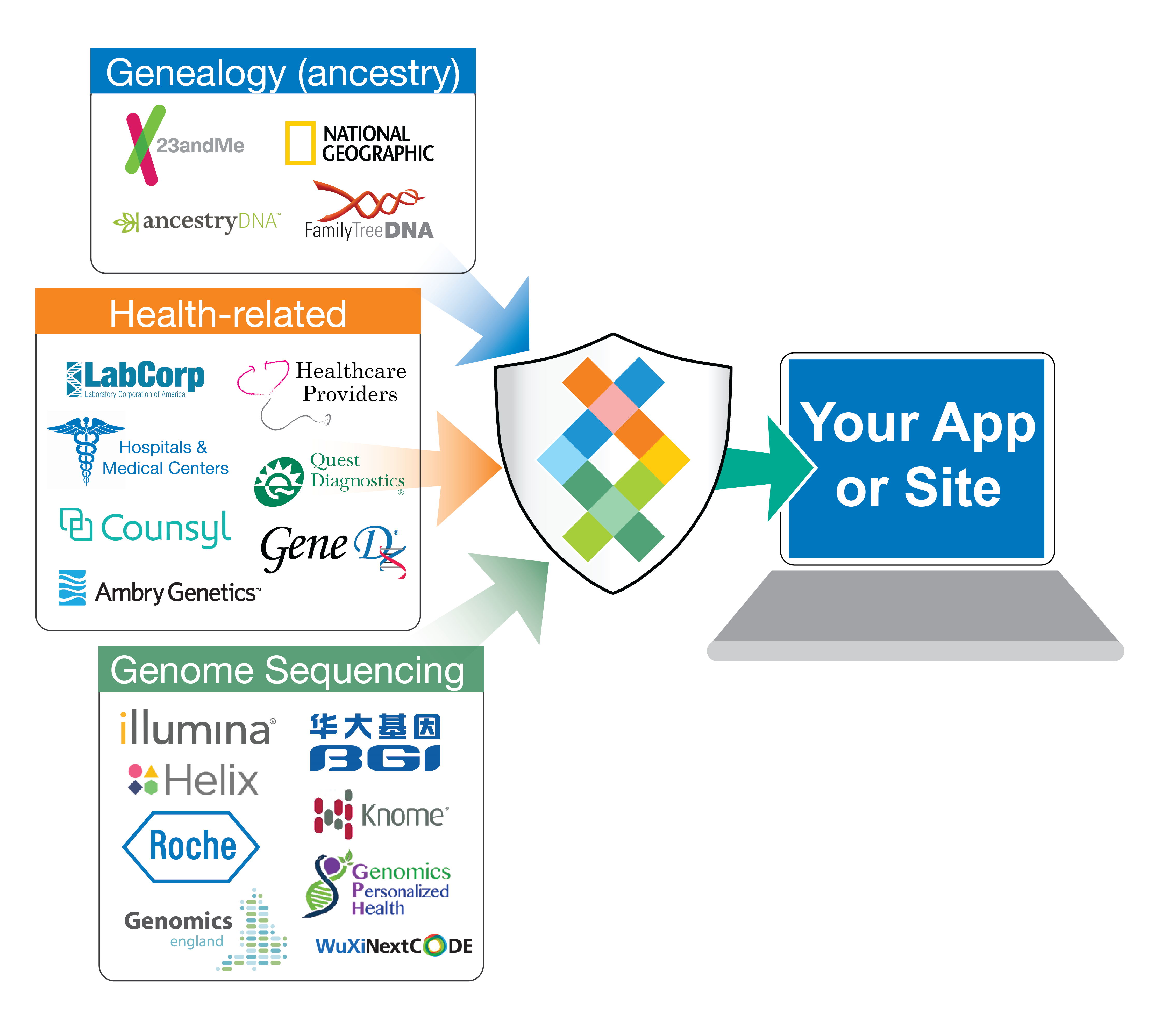
DNA App Store API for adding, marketing and selling DNA analysis apps in Sequencing.com's DNA marketplace that provide bioinformatics processing of genetic data. The API securely communicates with the app and sends raw genetic data to sites and apps. The API provides an app with access to, and compatibility with, all DNA formats including Ancestry, Helix, 23andMe, Genes for Good, Family Tree DNA, LivingDNA, Vitagene, HomeDNA, DNAland, Veritas Genetics, Genos, HLI, NGS and both exome WES and whole genome sequencing WGS.

Sequencing.com is the world's largest online marketplace for DNA-powered apps and personalized products.

Our users love apps that transform their genetic data into meaningful and actionable information.

  • If you've developed an app that is powered by genetic data, the App Market API allows you to tap into our incredibly large number of users by selling your app in Sequencing.com's App Market.


  • When you add your app to Sequencing.com's App Market, you no longer have to focus time or expense on data compatibility, data storage, data security, marketing, user acquisition and payment processing. We'll handle all of this for you so you can focus on developing awesome apps.

Introduction

The App Market API enables quick integration of your apps into Sequencing.com App Market. 

Use this API to sell your app in Sequencing.com's App Market while continuing to host your app on your own site.

  • The user’s genetic data is processed using your systems/infrastructure.
  • The App Market API is simple and it's just about 3 calls between Sequencing.com and your system.
  • We are developer friendly and provide you with API plugins, a secure integration environment and a convenient development console so you can test and trace while implementing the API.


Benefits

  • Requires limited development effort.
  • Your app can be available for sale in the App Market in a few days.
  • Your app instantly becomes universally compatible with all genetic data formats.
    • Without any coding effort on your part, your app will instantly be compatible with genetic data from almost any source including whole genome sequencing, exome sequencing, 23andMe (all versions), Ancestry.com (all versions), Family Tree DNA (all versions), National Geographic (all versions), and many other genetic testing provides.
    • You no longer have to worry about data file compatibility. As new data formats are released, Sequencing.com will seamlessly enable new data formats to be compatible with your app.
  • Your app obtains access to Sequencing.com’s large user base that is growing at an incredibly fast rate.
  • Your app becomes part of a centralized market for apps powered by genetic data.
  • Your app benefits from the marketing and PR initiatives of Sequencing.com

Cost

100% FREE

Adding your app to Sequencing.com's App Market is completely free.

We don't believe in pay-to-play. There's no upfront fee and we never charge to integrate or use our App Market API. We also provide free technical support throughout the entire integration process and beyond.

API Overview

The App Market API is designed to be quick, easy and painless for you to integrate into your site. 


When you use the API, this is what will occur at Sequencing.com

  • Your app is marketed and sold in Sequencing.com’s App Market


  • When a user purchases your app, your app will be added to the user’s My Apps page along with a ‘Start’ button. The user can then use your app at any time.


  • When user clicks ‘Start,’ the user will be able to select a genetic data file stored in his or her Sequencing.com account.
    • You can also have the option to have the user provide non-genetic information, such as data your app requires. This can be any non-genetic information such as the user's age, gender, BMI, height, weight, etc.


  • Sequencing.com will send your system a secure API call letting your system know that a user has submitted a genetic data file for processing that will include :
    • security authentication
    • identification of the app
    • identification of the app user
    • secure access to the app user’s genetic data
    • any non-genetic information provided by the user (optional)


  • Sequencing.com will preprocess the genetic data so that when you receive it, the data is already compatible with your system. This includes:
    • the specific format your system requires to process the genetic data (such as genomeVCF, 23andMe txt, csv, etc.)   learn more about selecting your system's optimal genetic data format
      • the user's genetic data can also be sent to your system via JSON, which is similar to 23andMe's API.
    • the specific subset of genetic data that your software is configured to process


This is what will occur at your site

  • The user’s genetic data is processed using your current system.


  • When the results are ready, your system will send an API call to Sequencing.com letting us know that the user’s data has been successfully processed. The results will be sent back to Sequencing.com using the API.


  • The user is notified that the results are ready.


  • The user signs into her or his Sequencing.com account to view the results of your app.

Generate Revenue From Your Apps


Terms are simple:

  • You pay nothing (ie you have nothing to lose).
  • You receive 75% of the sales price of your app.
    • Payment will be sent to you every two weeks via ACH deposit, Wire, Paypal or Venmo.

Monetization Dashboard

The Monetization Dashboard provides you with real-time sales statistics so you can easily monitor your sales and royalties.

You can also view all payments sent to you from Sequencing.com and easily modify the method by which you receive your monthly payments.


View the Monetization Dashboard demo

Universal Genetic Data Compatibility

When your app is added to Sequencing.com's App Market, your app will also become instantly compatible with all genetic data formats generated by any genetic test.

This includes whole genome sequencing data, exome data and data from all consumer genetic testing companies such as AncestryDNA, 23andMe and MyHeritage.


DNA Marketplace API for adding, marketing and selling DNA apps in Sequencing.com's DNA App Store. The API securely sends raw genetic data to sites and apps. The API provides universal data compatibility for all DNA formats including Ancestry, Helix, 23andMe, Genes for Good, Family Tree DNA, LivingDNA, Vitagene, HomeDNA, DNAland and exome and whole genome sequencing WGS.

App Pricing

Sequencing.com provides PCI-compliant payment processing for your app. You are able to not only set the sales price for your app but also determine the sales terms.

  • Important consideration: A large percentage of Sequencing.com users have more than one genetic data file in their account, such as a single account that contains the genetic data for each family member. This is important to take into consideration when selecting the sales terms.


Sales Terms

  • Price Per File
    • User is charged the app's sales price any time the user starts the app with a genetic data file that has not been previously processed by that app.
    • Example: If a user pays for File A and File B to be processed by your app, the user will be charged your app's sales price for both File A and File B. If in the future the user starts your app with File A again, the user will not be charged for this app job because File A was already processed by that specific app.


  • Price Per Use
    • User is charged the app's sales price each time the user starts the app.
    • Example: If a user pays for File A to be processed by your app, the user will be charged your app's sales price for File A. If in the future the user starts your app with File A again, the user will be charged again.


  • Price Per App
    • Unlimited: User is charged a single upfront price for your app and can then use the app an unlimited number of times. The app never expires.
    • Limited Time Only: User is charged a single upfront price for your app and can then user the app an unlimited number of times within a specific length of time.
      • You determine the time period, which can be any length of time. The most popular is three months. After the time period, the app will expire from the user's account and the user will have to re-purchase your app.
    • Limited Use Only: User is charged a single upfront price for your app and can then use the app up to a maximum amount without time limitation.
      • You determine the amount of usage. After the app is used the maximum amount, the app will expire from the user's account and the user will have to re-purchase your app.
    • Limited Time & Use (Mixed): User is charged a single upfront price for your app and can then use the app up to a maximum amount with a time limitation.
      • You determine both the time period and the amount of usage. After the app is used the maximum amount OR if the time period is reached, the app will expire from the user's account and the user will have to re-purchase your app.


Special Terms

The Special Terms below can be added to any of the Pricing Terms above. These Special Terms enable you to provide an incentive for the user to experience your app. 

  • Introductory Pricing
    • User is charged an introductory price for a limited amount of time or uses. Once the time or usage threshold is reached, the user is thereafter charged your app's standard sales price.
      • You determine the introductory price as well as the time period and/or the maximum number of usage allowed.
      • Example: A user purchases your app and is charged $10 for the first use. After the first use, the user is then charged $20 thereafter whenever that app is used.


  • Free Trial
    • User can use your app for free during a limited amount of time or uses. Once the time or usage threshold is reached, the user is thereafter charged your app's standard sales price.
      • Example: A user purchases your app and can use the app once for free. After the first use, the user is then charged $20 thereafter whenever that app is used.


Generate Additional Revenue By Creating App Chains

When you submit an app to the Sequencing App Store you’ll also be able to designate one or more results from your app as App Chains. This means that other developers can then use the output from your app when they use the Real-Time Personalization® (+RTP) API.

Each time your App Chain is used during an API call by an app powered by the +RTP API, you will receive a royalty payment.

App Market Integration

Technical Overview

The App Market API is designed to require only minimal changes, if any, to your system. 

  • Sequencing.com provides API plugins including bootstrap code, a secure Integration environment for testing your app's integration before production deployment, straightforward documentation, and 24/7 support. 
  • Our goal: ensure that adding your app to Sequencing.com's App Market is quick and easy.

Have a question or ready to get started?

Interactions: Your System <> Sequencing.com

  • You implement the App Market API and your app is added to Sequencing.com's App Market.


  • You provide your app's assets (company logo, app icon, app description, visuals such as images or videos, etc.) to Sequencing.com and specify your app's sales price and terms of sale.


  • Once the App Market API has been implemented, a user can view and purchase your app in Sequencing.com’s App Market.


  • After purchasing your app, the user can use your app at any time simply by signing into his or her Sequencing.com account.


  • When the user starts your app, the user selects a genetic data file stored in his or her Sequencing.com account.
    • Sequencing.com provides your app with Universal Compatibility with all genetic data formats from all genetic testing technologies. This includes everything from whole genome sequencing data to consumer genetic testing services such as AncestryDNA and 23andMe.
    • In addition to genetic data, the user can also provide non-genetic information such as the user’s age, gender, BMI, height, weight, etc.
      • You determine what non-genetic information, if any, is necessary for the user to provide so that your app(s) processes successfully.
    • Sequencing.com will ask the user to provide this information when the user starts your app and will then securely transmit this information to your system using the App Market API.


  • Sequencing.com sends your system an API call letting your system know that a user has submitted a genetic data file for processing that will include the following (discussed in detail in the API Specifications section below):
    • security authentication
    • identification of the app
    • identification of the app user
    • access to the app user’s genetic data
    • any non-genetic information provided by the user (optional)


  • Using the API call above, Sequencing.com sends your system the user’s genetic data (along with any non-genetic information your app needs) and your app processes the data. Processing of the data is performed using your system's current workflow.
    • You determine the file format of the genetic data that Sequencing.com will make available to your system.
      • Regardless of the format of the data stored in the user's Sequencing.com account, our Universal Genetic Data Compatibility technology will provide genetic data to your system in any format that is compatible with your system. Adding your app to Sequencing.com's App Market makes your app instantly compatible with all genetic data formats.
        • Example 1: User has whole genome sequencing data as paired FASTQ files but your system is only configured to process 23andMe v4 data. Our Universal Genetic Data Compatibility technology instantaneously makes the user's data available to your system in 23andMe v4 format. You can even choose to receive the genetic data as a 23andMe-compatible CSV file or via 23andMe-compatible JSON streaming.
        • Example 2: User has AncestryDNA data but your system is only configured to process VCF files. When this user uses your app, the user's genetic data is made instantly available to your system in VCF format.


  • When the app results are ready, your system sends an API response to Sequencing.com letting our system know that the user’s data has been successfully processed and that the results are ready for the user to view. This will include (discussed in detail in this document):
    • security authentication
    • identification of the app
    • identification of the app user
    • url (to your site) for the app user to access the results (optional)
    • a copy of the results, such as a pdf, html file or a png/jpg (optional)


  • Sequencing.com notifies the user that the app results are ready and provides guidance for accessing the results. The user views the app results either at your site or at Sequencing.com or both. It's your choice.
    • User accesses the app results at your site.
      • This is usually accomplished by providing the user with a url that includes a token. We can also provide the user with a url to your site and a username and temporary password (both generated by your system and provided to the user when Sequencing.com notifies him or her that the app results are ready).
    • For optimal UX, the API also allows your system to send the app results to Sequencing.com as a pdf, html file(s) or image file(s). These files are then securely stored in the user's Sequencing.com account for free and forever (ie they never expire).
      • The the user will then be able to access, share, download or delete the results at any time.
    • Alternatively, some dvelopers perfer for the app results to only be accessible via Sequencing.com. If you prefer this approach, simply configure the API to only send the results as a file to Sequencing.com without providing a URL that the user can use to access the results to your site. (Discussed in the documentation below.)

UML Sequence Diagram

The interactions discussed above are visualized in the following UML Sequence Diagram


UML Sequence Diagram

Getting Started

To add your apps to Sequencing.com's App Market:

1) Read the App Market API documentation below.

2) Submit a Support Request stating that you want to become a Registered Developer.*

3) Once you become a Registered Developer, you'll receive access to Sequencing.com's private integration environment called JEDI.

4) Use the Development Console at JEDI to test your endpoints.

5) Once your endpoints are working, we'll add your apps to JEDI's private App Market. This will allow you to test the entire workflow end-to-end in an actual (but private) App Market.

6) Only after you approve your apps in the JEDI App Market will we deploy your apps to the publically accessible App Market at Sequencing.com (ie our production site).


*Please note that you cannot access JEDI, use JEDI's Development Console or proceed forward with implementing the App Market API until you contact Support. Our Support Team will send you additional resources for using the App Market API as well as Sequencing.com's Registered Developer Agreement.

Becoming a Registered Developer allows you to access JEDI and proceed forward with adding your apps to Sequencing.com's App Market by implementing the App Market API.

Become a Registered Developer

It's simple, quick and free to become a Registered Developer.

Becoming a Registered Developer is also a necessary first step towards adding your app to Sequencing.com's App Market.


Registered Developers

  • are assigned a dedicated onboarding team member who will serve as your point of contact and facilitate the entire onboarding process
  • receive access to JEDI, Sequencing.com's Integration Environment
  • receive an active authorization token to use during your development and integration
  • receive access to additional documents that help with integration
  • receive ongoing technical support and assistance
  • can communicate directly with our On-boarding team via Skype group chat


To get started, please submit a Support Request and let us know you are interested in becoming a Registered Developer. We'll then guide you through the simple registration process.

JEDI Integration Environment

Sequencing.com's provides registered developers with access to a dedicated, secure integration environment called JEDI.

JEDI includes a Development Console, which enables you to test your integration of the App Market API. Using JEDI, you'll also be able to view your app and perform end-to-end testing of your app(s) in a private App Market that is not accessible by the public.

Once the integration is complete and you approve your app appearance in the App Market, your app will be ready for launch in Sequencing.com's production App Market.


JEDI Integration Environment: https://jedi.sequencing.com

Development Console

The Development Console allows you to test and verify your integration of the App Market API.

The console includes the following tests:

Authentication test

Job submission test

  • Includes sending demo genetic data to your system in either VCF or 23andMe txt format.
    • Although it doesn't yet appear as an option in the Development Console, we also have 23andMe JSON format available as a demo format. Just let us know if you want to use the console with this format and we'll make it so.
  • Sequencing.com Universal Genetic Data Compatibility technology is provided for free to all apps available in our App Market. This makes your system fully compatible with almost all genetic tests and genetic data formats, including whole genome sequencing, without requiring you to perform any additional development effort now or in the future.
  • This unique technology also includes the ability to send genetic data to your system in any format. 
    • At the beginning of the integration process, you simply let us know the genetic data format your system is already optimized for.  Regardless of the user's actual genetic data format, Sequencing.com will provide your system with the user's genetic data in the format your system is already optimized for.
      • For example, if your app is already optimized for processing genetic data in AncestryDNA format, simply let us know that your app works best with this format. The user can then select any file format when starting your app at Sequencing.com, such as FASTQ, FASTA, BAM, SAM, VCF, 23andMe, Genes for Good, etc., and Sequencing.com will send the genetic data to your system in AncestryDNA format.

Job result retrieval test

Job status retrieval


Development Console: https://jedi.sequencing.com/development-console


NOTE: A demo Sequencing.com Authentication Token is required to use the JEDI Development Console. Please contact Support to obtain this demo token.

Demo genetic data

Use the Development Console's Job Submission Test to receive demo genetic data via the App Market API.

Demo Genetic Data via App Market API

API Specifications

1.1 Your system endpoints

Sequencing.com provides 3rd party side implementation of the following endpoints. Check our GitHub repository for available implementation.

Use the Development Console to test your endpoints and conduct testing integration.


All HTTP endpoints described in this section should be located on your side and invoked by Sequencing.com servers.

All requests that are sent to endpoints by Sequencing.com servers contain following HTTP headers.

#
Header name
Data type
Mandatory
Description
1 Referer string yes

Hostname that triggered request.

Value examples:

Value
Description

jedi-api.sequencing.com

Integration environment

api.sequencing.com

Production environment

This header allows your system to identify Sequencing.com's source environment that triggered the request to your system.

This is helpful if you only have a single environment on your end.


1.1.3 Your system's job results retrieval endpoint

Is called from Sequencing.com side for all job results retrieval.


Request specification

  • Data format: JSON 
  • Method: POST
#
Field name
Data type
Mandatory
Description
1 sequencingJobId long yes Sequencing.com job identifier
2 applicationId int yes Application ID so your system can identify which app the user purchased (indicates to your system what kind of processing is needed)


Request header specification

#
Header name    
Data type   
Mandatory
Description
1 Authorization string yes

Value of this header must contain “Bearer ” concatenated with the token that was sent to Sequencing.com in a reply to authentication request as per Section 1.1.1.

This is required to authorize Sequencing.com systems to access your endpoint


Invocation example

$ curl -XPOST -H "Content-Type: application/json" -H "Authorization: Bearer <authenticationToken>" --data '{"sequencingJobId":123, "applicationId":10}' https://www.somewhere.com/external/sequencing/job/get

where <authenticationToken> should present token to access your system's endpoint.


Response body payload specification

The same as request specification in Section 1.1.1.

1.1.2 Your system's job submission endpoint

Description: This is endpoint that needs to be implemented by your system

Purpose: Provides your system with data needed for processing.

This endpoint should be secured and accessed by using the token we sent to your system in a request described in Section 1.1.1 above


Request body payload specification

  • Data format: JSON
  • Method: POST
#
Field name
Data type
Mandatory
Description
1 sequencingJobId long yes Sequencing.com job identifier
2 applicationId int yes

Application ID so your system can identify which app the user purchased (indicates to your system what kind of processing is needed)

3 dataFileId string yes

ID of file to retrieve from data access host. This file contains the user's genetic dataset that will be processed by your app.

There will be one dataFileId for each of the user's files. This ID will remain constant except if the dataset sent to your system for the file must be regenerated.

For example, if your app is originally receiving data on 100 variants from Sequencing.com but then at a later date you increase this to include 50 additional variants (so the dataset Sequencing.com will send your system is now 150 variants), if a new sequencingJobId is started by that same user (same userId) for the same file (same masterFileId), the dataset from that file will be regenerated so that the dataset sent to your system now consists of 150 variants. When the dataset from the user's file is regenerated, the dataFileId will change.

If the dataFileId for a new sequencingJobId is different than the dataFileId in the previous job but masterFileId is the same: this means the previous dataset generated from that user's file has expired and your system should obtain the new (current) dataset for that masterFileId. 

4 masterFileId string yes

ID of the user's file at Sequencing.com. This ID is provided for identification purposes only; it is not used to retrieve anything from data access host.

There will be one masterFileId for each of the user's files. This ID will always remain constant even if dataFileId is regenerated. This endpoint enables your system to identify whether data is from the same file or a different file in the user's Sequencing.com account. This is important because many users have more than one genetic data file stored in their Sequencing.com account.

While userId can be used to define a 'user account' on your system, masterFileId can be used to define a 'profile' in a user account. This will enable your system to be able to create one or more profiles for each user account because if the user starts two or more app jobs using your app(s), your system will be able to identify the app jobs were started by the same user (same userId) and that the app jobs are either using data from the same file in the user's Sequencing.com account (same masterFileId) or are using data from a different file in the user's Sequencing.com account (different masterFileId).

5 userId string yes

User identifier so your system can identify a specific user; enables your system to identify if the same user makes multiple purchases of your apps.

userId can be used to define a 'user account' on your system.

6 attributes Map<String, String> no

Additional job specific attributes, such as the user's age, weight, etc., that are sent from Sequencing.com to your system.

While the user will be able to enter weight and height in either Metric or Imperial units, all data will be converted to Metric and provided to your system as Metric (weight in kg and height in cm).


Request header specification

#
Header name  
Data type  
Mandatory
Description
1 Authorization string yes

Value of this header must contain “Bearer ” concatenated with the token that was sent to Sequencing.com in a reply to authentication request as per Section 1.1.1.

This is required to authorize Sequencing.com to access your endpoint.


Invocation example

Note: The dataFileId, masterFileId and userId used below are for example purposes only. They are not active and will not work. Please contact Support to become a Registered Developer. You will then receive active data for these fields to use during your development and integration.

$ curl -XPOST -H "Content-Type: application/json" -H "Authorization: Bearer <authenticationToken>" --data '{"sequencingJobId":123, "applicationId":10, "dataFileId":"efce558e-3237-4805-b03d-7d182b569679 ", "masterFileId":"9f7202ce-9316-49bf-8eb4-0ea99538f664", "userId":"36A16A2505369E0C922B6EA7A23A56D2", "attributes":{"Age":"36","Ethnicity":"White","Gender":"Male","Height":"163","Weight":"70"​}' https://www.somewhere.com/external/sequencing/job/register

where <authenticationToken> should present token to access your system's endpoint.


Response body payload specification

  • Data format: JSON
#
Field name
Data type
Mandatory
Description
1 status integer yes

Job submission status

  • 0 - job has been successfully scheduled for execution
  • 1 - error occurred while scheduling job
2 error string no In case status=1, error text with more details on the issue


1.2 Sequencing.com endpoints

All Sequencing.com endpoints expect apiKey URL query parameter to be passed. Its value is acquired from the call to 1.1.1 endpoint.

1.2.1 Sequencing.com genetic data retrieval endpoint

The App Market API provides developers of DNA apps and bioinformatics experts who create genome apps with automatic access to Sequencing.com's Universal DNA Data Compatibility technology, which makes genetic apps instantly compatible with all DNA tests and genetic data file formats.

When implementing the App Market API, you'll indicate to Sequencing.com's Onboarding Team what genetic data format is most optimal for your system to process. We'll then configure the App Market API so that whenever a user purchases your app, the user's data will always be provided in the data format your system is already optimized for. 

  • You can select to receive a user's genetic data in almost any format including gVCF, VCF, Clinical+ VCF, 23andMe data file, 23andMe JSON API, Ancestry.com data file, BAM, FASTQ, etc. 
    • Example: Your system is already configured to process 23andMe v4 data files.
      • You'll indicate this to the Sequencing.com Onboarding Team so that whenever your apps are used, Sequencing.com will send the user's data to your system in 23andMe v4 format.
      • Even if the user has selected a FASTQ or BAM file as the input file for your app, Sequencing.com will instantly send you the data in 23andMe v4 format.
        • Sequencing.com's Universal Genetic Data Compatibility enables your app to instantly become compatible with all genetic data formats.
          • This allows you to focus on creating the best possible apps while Sequencing.com handles the complexities and ensuring your app is always compatible with all data formats.


Purpose

This required endpoint provides your system with the ability to securely obtain the user's genetic data.


Request specification

Data format: octet-stream

Method: GET

URI (Integration Environment): https://jedi-data.sequencing.com/File/Download

URI (Production Environment): https://data.sequencing.com/File/Download


Request parameters

#
Parameter
Data type
Mandatory
Example value
Description
1 id string yes 1966FE4B-41D7-420A-8962-66555E8E72DD File ID
2 json int no 1 If specified, returns output in JSON format in response body compatible with 23andMe's API endpoint
3 file int no 1 If specified together with "json" parameter, data will be provided as a downloadable content via "Content-disposition: attachment"
4 compressed int no 1 If specified together with "json" and "file" parameters, will be provided as a downloadable content via "Content-disposition: attachment" compressed with gzip


HTTP headers

#
Header name
Data type
Mandatory
Description
1 Authorization string yes Token provided by Sequencing.com on the authorization phase


Invocation examples

Note: The id and Authorization Token used below are for example purposes only. They are not active and will not work. Please contact Support to become a Registered Developer and obtain an active Authorization Token.


1) Source format (VCF or 23andme depending on what format ou indicate is most optimal for your system)

$ curl -XGET 'https://data.sequencing.com/File/Download?id=89e929b7-0c8e-4a1d-951d-917ebee5ef64' -H "Authorization: Bearer SSESS4595a8c94ea23d8eae6124e5b5819d9b|1zFZ0uEhREFw5xbE8BbAONFmJTUO6NJN2IdaIqsdvlE|8D266E6A-2BA8-4ECC-896B-328CCAAF014D" -v -o result.vcf


2) JSON format with data in response body

$ curl -XGET 'https://data.sequencing.com/File/Download?id=89e929b7-0c8e-4a1d-951d-917ebee5ef64&json=1' -H "Authorization: Bearer SSESS4595a8c94ea23d8eae6124e5b5819d9b|1zFZ0uEhREFw5xbE8BbAONFmJTUO6NJN2IdaIqsdvlE|8D266E6A-2BA8-4ECC-896B-328CCAAF014D" -v

Output example:

{
  "rs4477212": "AA",
  "rs3094315": "AA",
  "rs3131972": "GG",
  "rs12124819": "AA"
}


3) JSON format as a downloadable content

$ curl -XGET 'https://data.sequencing.com/File/Download?id=89e929b7-0c8e-4a1d-951d-917ebee5ef64&json=1&file=1' -H "Authorization: Bearer SSESS4595a8c94ea23d8eae6124e5b5819d9b|1zFZ0uEhREFw5xbE8BbAONFmJTUO6NJN2IdaIqsdvlE|8D266E6A-2BA8-4ECC-896B-328CCAAF014D" -v -o result.json


4) JSON format as a downloadable content compressed with gzip

$ curl -XGET 'https://data.sequencing.com/File/Download?id=89e929b7-0c8e-4a1d-951d-917ebee5ef64&json=1&file=1&compressed=1' -H "Authorization: Bearer SSESS4595a8c94ea23d8eae6124e5b5819d9b|1zFZ0uEhREFw5xbE8BbAONFmJTUO6NJN2IdaIqsdvlE|8D266E6A-2BA8-4ECC-896B-328CCAAF014D" -v -o result.json.gz

where <sequencingAuthenticationToken> should present a token to access the endpoint on Sequencing.com that is acquired during authentication without brackets (refer to Section 1.1.1 for more details).

1.2.2 Sequencing.com job status notification endpoint

Purpose

This required endpoint provides your system with the ability to securely provide app job results.

This endpoint should be secured and accessed by using the token sent to your system in a request described in Section 1.1.1.


Depending on how your server side works, Sequencing.com offers three options for delivering the app results to the user.

You can implement one or more of the options. Optimal UX is obtained by implementing option 1 or option 2. 


Once your system finishes processing the app job and the results are ready:


1) Downloadable Copy of Results URL (field name: outputFiles)

  • Provides optimal UX.
  • Sequencing.com will not provide this link (outputFiles, the Downloadable Copy of Results URL) to the user and instead will only use this link to download a static copy of the app job results.
    • The link (the Downloadable Copy of Results URL) should allow Sequencing.com's system to access a downloadable file at your site, such as a graphical representation of the app results for that user.
      • Acceptable formats include: PDF, file containing HTML, image (png, jpg), etc. We support most formats.
    • The link should reply with application/octet-stream MIME type.
    • Sequencing.com will download this file from your system and will securely store it in the user’s Sequencing.com account.
      • The user will be able to view the app results simply by accessing his or her Sequencing.com account.
        • Storing the app results in a user's account is free for both your system and the user.
        • App results are secure and confidential. They are stored forever in the user's account (ie they never expire and are not deleted).
        • The user can share, download and delete the app results at any time.
    • Having a copy of the app results from your system saved in the user’s account will allow the user to view the app job results at Sequencing.com.
    • If option 3 is implemented along with this option then the app results at Sequencing.com will also include the Callback URL.


2) Base64 encoded PDF report in the body of request (field name: outputFilesContents)

  • Provides optimal UX.
  • The PDF report will be securely stored in the user’s Sequencing.com account.
    • The user will be able to access the PDF report by logging into her or his Sequencing.com account.
      • The user can share, download and delete the app results at any time.
      • App results are secure and confidential. They are stored forever in the user's account (ie they never expire).
      • Storing app results in a user's account is free for both you and the user.
  • Having a copy of the app results from your system saved in the user’s account will allow the user to view the app job results at Sequencing.com. This provides optimal UX.
    • This Callback URL provides the user with direct access to your site so they always have the choice to view the app results at Sequencing.com or at your site.
  • If option 3 is implemented along with this option then the app results at Sequencing.com will also include the Callback URL


3) Callback URL (field name: callback)

  • This URL will be conveyed to the user.
  • Your system will use the API described here to send Sequencing.com a link (the Callback URL) to your site. 
  • Sequencing.com will then convey this Callback URL to the user: ‘Your app has completed successfully. Click here to view the results.’
  • The user will use this link (the Callback URL) to access his or her results at your site.
  • For security, the Callback URL may include
    • a security token <-- Preferred due to better UX
    • or
    • dynamically generated credentials (username and temporary password)
      • this credentials will allow the user to access his or her results at your site after clicking the Results URL


Sequencing.com uses job status reporting so our system is aware of the status of the app at your system. This allows Sequencing.com to know if the app at your system has started, completed or failed due to specific reasons. This job status notification endpoint may be called several times for each app job.


Request specification

Data format: JSON

Method: POST

URI (Integration Environment): https://jedi-api.sequencing.com/v1/TpUpdateExternalJob

URI (Production Environment): https://api.sequencing.com/v1/TpUpdateExternalJob


Request parameters

# Field name Data type Mandatory Description
1 sequencingJobId long yes Sequencing job identifier
2 status int yes

Processing status:

  • 0 - running
  • 1 - completed
3 completionStatus int no

Processing status:

  • 0 - success
  • 1 - general error, unknown reason
  • 2 – error downloading genetic data file
  • 3 – error processing genetic data file

If 1, 2 or 3 then this means no results are available. The user will receive a notification from Sequencing.com that there was an issue with the app and to please restart the app.

Sequencing.com's App Team will also be automatically notified and will investigate.

4 errorMessage string no Extra error message if status>1
5 outputFiles Map<string, string> no

Contains copy of app results.

Key - file description

Value - URL to the appropriate resource

There is no limitation on content returned by this URL.

This URL should be directly accessible without authentication.

6 outputFilesContents Map<string, string> no

Contains copy of app results as base64 encoded PDF file.


Key - file description/name

Value - Base64 encoded contents of PDF report

7 attributes Map<string, string> no Additional job specific attributes, such as the user's age, weight, etc., that are sent from Sequencing.com to your system
8 callback object no

Object of following structure

Field name Data type Mandatory Description
url string yes

URL that will be provided to the user so that the user can access and view the app results at your site.

Sequencing.com recommends providing a URL that includes a token to identify a specific user. This provides improved UX compared to using the username and password fields.

username string no

Optional username and password that is dynamically generated by your system. The user will enter these credentials in the form based authentication at your site to access. This will allow the user to access and view the app results at your site.

password string no Optional username and password that is dynamically generated by your system. The user will enter these credentials in the form based authentication at your site to access. This will allow the user to access and view the app results at your site.

Invocation Examples

Example 1

Your system starts processing data.

$ curl -XPOST -H "Content-Type: application/json" --data '{"sequencingJobId":123, "status":0}' https://api.sequencing.com/v1/TpUpdateExternalJob?apiKey=<sequencingAuthenticationToken>


Example 2

Your system finishes processing with error due to inability to download the user's genetic data file from Sequencing.com.

$ curl -XPOST -H "Content-Type: application/json" --data '{"sequencingJobId":123, "status":1, "completionStatus": 2}' https://api.sequencing.com/v1/TpUpdateExternalJob?apiKey=<sequencingAuthenticationToken>


Example 3

Your system encounters an unknown error during app job processing that causes the app to stop (ie the app is unable to continue processing the user's data).

$ curl -XPOST -H "Content-Type: application/json" --data '{"sequencingJobId":123, "status":1, "completionStatus": 1, "errorMessage":"Error or exception specification"}' https://api.sequencing.com/v1/TpUpdateExternalJob?apiKey=<sequencingAuthenticationToken>


Example 4

Your system has successfully finished processing (ie your app completes processing the user's data) and sends two base64 encoded PDF reports (without callback URL).

$ curl -XPOST -H "Content-Type: application/json" --data '{"sequencingJobId":123, "status":1, "completionStatus": 0, "outputFilesContents": {"Result1":"base64encodedPDF","Result2":"base64encodedPDF"}}' https://api.sequencing.com/v1/TpUpdateExternalJob?apiKey=<sequencingAuthenticationToken>


Example 5

Your system successfully finished processing and sends both base64 encoded PDF and callback URL with token.

$ curl -XPOST -H "Content-Type: application/json" --data '{"sequencingJobId":123, "status":1, "completionStatus": 0, "callback": {"url":"https://www.somewhere.com/external/sequencing/callback?refid=cb02a3723424ff1b0be1d53fba5b6c2207a6017c"}, "outputFilesContents": {"Result1":"base64encodedPDF"}}' https://api.sequencing.com/v1/TpUpdateExternalJob?apiKey=<sequencingAuthenticationToken>


Example 6

Your system has successfully finished processing and sends one downloadable PDF report using results URL (without callback URL).

$ curl -XPOST -H "Content-Type: application/json" --data '{"sequencingJobId":123, "status":1, "completionStatus": 0, "outputFiles": {"Result":"https://www.somewhere.com/0/1/223/result.pdf"}}' https://api.sequencing.com/v1/TpUpdateExternalJob?apiKey=<sequencingAuthenticationToken>


Example 7

Your system has successfully finished processing and sends two downloadable PDF reports using two results URLs (without callback URL).

$ curl -XPOST -H "Content-Type: application/json" --data '{"sequencingJobId":123, "status":1, "completionStatus": 0, "outputFiles": {"Melanoma risk result":"https://www.somewhere.com/0/1/223/result1.pdf", "Vitamin D result":"https://www.somewhere.com/0/2/334/result2.pdf"}}' https://api.sequencing.com/v1/TpUpdateExternalJob?apiKey=<sequencingAuthenticationToken>

where <sequencingAuthenticationToken> should present a token to access endpoint on Sequencing.com that is acquired during authentication without brackets (refer to Section 1.1.1 for more details).


Example 8

Your system has successfully finished processing and sends callback URL only (without providing PDF report).

$ curl -XPOST -H "Content-Type: application/json" --data '{"sequencingJobId":123, "status":1, "completionStatus": 0}, "callback": {"url":"https://www.somewhere.com/external/sequencing/callback?refid=cb02a3723424ff1b0be1d53fba5b6c2207a6017c"}}' https://api.sequencing.com/v1/TpUpdateExternalJob?apiKey=<sequencingAuthenticationToken>


Example 9

Your system has successfully finished processing and sends the callback URL with dynamically generated username and password.

Sequencing.com will convey this Callback URL along with the username and password to the user and user will use this to login to your site to obtain access to app job results. This example applies only if a Callback URL is included while a Downloadable Copy of Results File URL is not included.

$ curl -XPOST -H "Content-Type: application/json" --data '{"sequencingJobId":123, "status":1, "completionStatus": 0}, "callback": {"url":"https://www.somewhere.com/external/sequencing/callback", "username": "5cpo07", "password": "x7hetra#3EBavah" }}' https://api.sequencing.com/v1/TpUpdateExternalJob?apiKey=<sequencingAuthenticationToken>


Example 10

Your system has successfully finished processing and sends both callback URL with token and pdf report using results URL.

$ curl -XPOST -H "Content-Type: application/json" --data '{"sequencingJobId":123, "status":1, "completionStatus": 0, "callback": {"url":"https://www.somewhere.com/external/sequencing/callback?refid=cb02a3723424ff1b0be1d53fba5b6c2207a6017c"}, "outputFiles": {"Result":"https://www.somewhere.com/0/1/223/result.pdf"}}' https://api.sequencing.com/v1/TpUpdateExternalJob?apiKey=<sequencingAuthenticationToken>


Example 11

Your system has successfully finished processing and sends callback URL with username and password and pdf report using results URL.

$ curl -XPOST -H "Content-Type: application/json" --data '{"sequencingJobId":123, "status":1, "completionStatus": 0, "callback": {"url":"https://www.somewhere.com/external/sequencing/callback", "username": "5cpo07", "password": "x7hetra#3EBavah"}, "outputFiles": {"Result":"https://www.somewhere.com/0/1/223/result.pdf"}}' https://api.sequencing.com/v1/TpUpdateExternalJob?apiKey=<sequencingAuthenticationToken>

Support

Have a question? Ready to add your DNA app to our App Market?

We're here to help!

Online: Support Request

Email: support@sequencing.com


Our Goal

Our goal is to ensure that adding your app to Sequencing.com's App Market is quick, easy and painless. We have several resources and tools to facilitate implementing the App Market API. If you don't see something that will be helpful, let us know and we'll implement it.


Tools & Resources

App Market API Plugin

Secure Integration Environment (for testing your app's integration before production deployment)

API Documentation

24/7 Support (provided via Slack throughout the process of adding your app to the App Market and thereafter)

Apps for bioinformatics

Code innovative bioinformatics-related apps by leveraging the Sequencing.com platform.

How can I leverage Sequencing.com Apps in my work?

Easy! Just call our APIs, then pass us the correct parameters and we generate and send you the data that you require.

Is there a real example of how this is done?

Yes. Say if you had dataset of several BAM files and if you wanted to convert them into Genome VCF or VCF files and if you had to change the reference genome files as a part of your workflow, then you would probably have to create custom scripts and run the script each time. In addition you would have to monitor the progress and in addition make sure the files pass the QC process. Now you may leave all that to sequencing.com. For e.g. our UGENE app, which is also available on sequencing.com app store, each functionality in the app can be used via an API. So in your code you would call the API for the UGENE app, passing in the correct parameters and in some time you will get the correctly formatted file. File storage, app execution and monitoring and notifications all happens on the sequencing.com platform at no cost to you. In addition call the APIS as much as you like, whenever you like and from any device that you like.

What other types of Apps are available?

We have apps that can be classified into several groups. There are apps such as UGENE that can convert most file formats to another format. Then there are also apps which can perform clinical analysis such as risk detection for multifactorial phenotypes and then there are also educational apps. This way you can simply call the APIs of an app can plug into your code.

What real value does this add to my work?

The Sequencing.com platform provides you API access to apps that are coded by our expert team members conforming to the standards in adherence to the literature.  Access the API 24x7, run your code, store your data and also make your app available as APIs for other developers to use.

Apps hosted on Sequencing.com

Apps hosted by Sequencing.com run on our powerful multithreaded cloud computing architecture and reach a global audience by being sold in the App Market.

​The first step is registering for a free account and the visiting the Developer Center.

Submitting an App

The instructions below are for submitting an app to Sequencing.com's App Market.

  • You own your code and we host your app on our platform, which means we take care of marketing, security, cloud computing resources, bandwidth and payment processing.

You may also use our API and App Chain technology to add Real-Time Personalization to apps on any platform, including iOS, Android and web. After adding Real-Time Personalization to your app, submit a Support Request and we'll include information about your app in the Sequencing.com App Market.


To submit an app, open a Support Request and select I want to submit my app.

Please include the following details in your request:

  1. Name of app
  2. Do you want Sequencing.com to host your app on our platform?
  3. Coding language your app is written in
  4. Is there a UI component to your app?
    • If yes, is there a prototype?
  5. What does your app do?
  6. What is the output of your app? (HTML, PHP, JSON, PDF, GFF3, SVG, CSV, etc.)
  7. Who will be the likely users of your app? (Individuals, Bioinformaticians, Researchers, Healthcare Professionals, etc?)


You do not need to submit actual code with this initial request. After submitting your request, a member of our A-Team (App Team) will contact you to further discuss your app.

Supported programming languages

A short list of the programming languages we support for apps hosted by Sequencing.com.

Don't see a language listed below? We probably support it. Submit a Support Request to find out.


  • Frontend: HTML, PHP, jQuery, CSS, AJAX, XML, JSON as well as ability to display videos, images, PDFs, CSVs, TXTs, Word, Excel, Google Sheets, Google Docs and Google Slides

  • Databases: MySQL, MariaDB, Percona, PostgreSQL, SQL Server, Hadoop, NoSQL databases including Cassandra, MongoDB, HBase and Couchbase, and even Excel and Google Sheets

  • Backend: Java, C++, .NET/C#, PHP, Perl, Python and Ruby

  • Mobile: Objective-C, Swift and Android

  • APIs: Most API infrastructures including SOAP and REST

  • Operating Systems: Apps that run on Linux (all major distros), Windows Server, Mac, iOS and Android

What if my app has special requirements?

Your app will under the system privileges setup for running all apps. If your app requires any special configuration such as increased memory then you may do so in your code i.e. code based memory management. If, however, you require system wide settings, you may contact us.

What format can my app output data?

It is recommended that you output your data as files so that storage on the server would be simpler.

You may decide the format for the files as per your requirements such as industry standard SAM/BAM/VCF etc. or in generic form such as text files. However you may pass the data in JSON format from the APIs since it is a requirement for our custom display modules to display data.

The Sequencing.com site can also display your app results as HTML/HTML5, PDFs, tables, graphs, images and video.

How can my app data be visualized?

We support several views for data. You may choose to show your data in a table that supports paging, sorting and a very advanced search. We also support line, bar or pie chart. If your data is a list of multimedia resources then you could also use our multimedia module to display data. We also support PDF viewers so you may choose to display data in PDF viewer. Your code will be responsible for generating the PDF.  For all modules except for the PDF files the data should be returned in JSON format. For PDF documents a URL will be generated and shown on the UI.

How can my app be tested online?

You may test your app on your dashboard. During the development process you may choose to upload your app or simply run it but not submit it to the app store. In that scenario you will be able to run your app but it will not be submitted for review. Depending upon the time of execution for the app, you will be able to debug, view results etc.

What is the App Approval Process?

Once you upload your app into our App Store, our team of experts will install your app and manage the QC process. Once everything checks out, you will receive a notification from us when your app is available in the app store for other developers.

App Approval Process

Once you upload your app, our team of experts will install your app and conduct a number of tests that will evaluate the efficiency of the code.

We also screen for malicious code or code that may otherwise put our community at risk. Once your code is reviewed and approved, you’ll receive an email notification with instructions on how to set the price of your app and make it available for purchase in the Sequencing.com App Market.

If during the Approval Process any issue is detected, you will receive an email notification that states the issue along with recommendations for correcting it. Once corrected, you may then re-submit your app code for approval.

App Deployment

Once you have coded your app it can be deployed and released to the world.

If you would like to make your app available to the world in Sequencing.com' App Market:

  1. Submit a Support Request to be connected to our On-boarding Team
  2. Review the documentation below for implementing the App Market API, which includes drop-in code that will allow you to quickly connect your system to Sequencing.com's App Market


Apps hosted at your site

App Market API

Sequencing.com provides two APIs for you to choose from:

1.  App Market API

  • Best if you've already developed software that processes genetic data and the software is running on your own system.


2.  Real-Time Personalization® (+RTP) API

  • Best if your software does not process genetic data but you want to provide your app users with a truly personalized user experience.

App Market API

To add your app to Sequencing.com's App Market, submit a Support Request or email dev@sequencing.com.

Sequencing.com's free App Market API enables your app to have all the benefits of being sold in Sequencing.com's App Market while leveraging the system and website you've already build.

Best if you’ve already created a unique backend system for processing genetic data and a frontend for providing results via a user interface.


When a user purchases your app, Sequencing.com will automatically and securely send your system that's user's genetic data.

  • We'll pre-process the user's genetic data so that when you receive it, 

    • it's in the format your system already uses

    • it's the specific dataset required for your software to process

  • We'll redirect the user to your site so that the user integrates directly with your site, uses your current UI, etc.


Detailed Overview


Benefits of selling your app in Sequencing.com's App Market

  • Join the largest global marketplace for apps powered by genetic data. 
  • Gain access to Sequencing.com's large and rapidly growing community.

  • Become instantly data agnostic so that users who have had genetic testing from any provider are now your potential customers

    • your app will instantly be able to accept data from almost any source including whole genome sequencing, exome sequencing, Helix, 23andMe (all versions), Ancestry.com (all versions), Family Tree DNA (all versions), National Geographic - The Genographic Project (all versions), Genes for Good and many others.

    • you no longer have to worry about genetic data compatibility. As new data formats are released, Sequencing.com will seamlessly enable these new formats to be compatible with your app.
  • Acquire awareness and adoption by leveraging Sequencing.com's marketing and user acquisition expertise.

Real-Time Personalization (+RTP) API

Real-time Personalization (RTP) technology is simple to integrate into any app.  

RTP uses APIs called App Chains that provide universal compatibility for all operating systems, devices and apps including iOS, Android, Mac OS, Windows, Linux and web servers.


Plugins

Our plugins provide all needed functionality out-of-the-box to add RTP to iOS, Android and Java apps. Each link also provides instructions for how to use the plugin.


The Master Plugins above provide all needed functionality to add RTP to your app. This includes enabling:

  • OAuth2
    • enables your app to securely connect to Sequencing.com.
  • a File Selector
    • allows each app user to view and select a file that is stored in his or her Sequencing.com account. RTP will utilize the genetic data contained within this file to provide your app with genetically tailored information.
  • App Chains
    • all you need to do is add one or more app chain #'s and configure your app for how you want it to respond based upon the potential responses for each app chain.


Additional languages

If your app is coded in a different language, App Chains are available in the following languages:

  • Swift
  • Objective-C
  • Java-Android
  • Java
  • Python
  • Perl
  • C#/.NET


Related

What is Real-Time Personalization?

What is the process of creating apps for other platforms?

Using an IDE of your choice you may code your app. RTP technology can be coded into apps that are available via any platform or OS, including iOS, Android, Mac OS, Windows and almost all distros of Linux.

Access to Sequencing.com's technology is via API. Because of this, you will be required to have some knowledge about making REST API requests and parsing the returned JSON data.

Once the data is available to your code then you may use it in your code logic. E.g. if you are creating a mobile app for the Apple iPhone then you might code your app in Objective-C or Swift and make API calls to the Sequencing.com backend.

If your app requires access to a user’s data then in your app you will be required to enable OAuth based authentication. If the user "Accepts" that your app and any app chains that your app may use may then access the user's genetic data stored at Sequencing.com. The user's genetic data will be made available only after you have passed the OAuth Token that was supplied.

You will then be able to use the returned data from the call in your code logic. At this point it will be up to you to use the data for your requirements. E.g. you might want to show tabular data, then you will be required to parse the data and make that as a data-source to the table controls in iOS.

Once your app has been created, you may upload it to iTunes Connect and if accepted by Apple then it would be available to end users.


Please note:

  • Only the genetic data pertinent to your app or the app chains you are using will be accessed.
  • While an App +RTP that are run on a platform outside of Sequencing.com may use an App Chain that utilizes, analyzes, processes, etc. a user's entire genome, Apps +RTP cannot retrieve or download a user's entire genome. 
  • While Apps +RTP can access and use data from within a user's genetic data file, Apps +RTP cannot download any of the actual genetic data files.
  • Apps +RTP are prohibited by Sequencing.com's Terms of Use from storing the output of an app chain. 
    • Updates to existing app chain may be released from time to time and seamlessly integrated into RTP. The benefit to you is that you do not have to recode your app each time an app chain is updated. This also means, however, that for users to always receive the most up-to-date (ie Real-Time) personalization, app chains must be re-run each time the app function is accessed that utilized +RTP technology. 
  • Apps +RTP are also prohibited from storing a user's genetic data.
    • Sequencing.com provides secure, HIPAA compliant storage of genetic data. Our Terms of Use allow for genetic data to be accessed but not stored. This is a necessary feature to help protect the security and ensure integrity of our user's genetic data.

App Chain Technology

The output of all apps that are present in the Sequencing.com app store are accessible via APIs - we call each API an App ChainTM. Because of this, apps created by Sequencing.com as well as other developers are available as APIs.

Apps can be of several different types such as apps for clinical analysis, apps that can convert one file type into another such as convert BAM to gVCF and yet others can be educational apps. All the functionality that apps provide is also accessible via APIs.

This works to your advantage so that you do not have to worry about the low-level work that is required but instead you may focus on the app functionality that your app is trying to provide.

How Can I leverage Sequencing.com technology?

Call our APIs passing in the correct parameters and generate the data that you require.

For example, this is as simple as passing the AppID of a certain app and correct parameters for that API to execute. If the validation passes then the app will execute and a JobID will be returned to your app.

You may then call another API passing in the JobID and you will return the status of your job. Please note that you will be responsible for coding a timer function to poll the job status API.

Once the job has completed you may then call another API passing in the JobID and the generated data will be returned to your code. You may then use the data as you see fit.

What is the App Sequencing Technology?

Sequencing.com app sequencing technology allows you to run apps in succession using our API.

For example, let’s assume that you would like the results from one app to be piped into another app. This commonly happens in bioinformatics analysis such as convert a BAM file to VCF using a certain reference genome and then pipe the result through an app for annotation and a second app for custom analysis.

The above can be easily accomplished with our app sequencing technology where you would chain apps in succession passing the results of one app as input to the second app and so on. This allows you to tap into granular functionality provided by our core apps as well as apps that are created by other app developers.

Submitting an App Chain

The instructions below are for submitting an app chain to be made accessible through Sequencing.com's API. This means the app chain will be hosted on our platform and when an API call is made to the app chain, the chain will run using our computing resources. 


To submit an app chain, simply submit a Support Request and select I want to submit my app.

Please include the following details in your request:

  1. Name of app
  2. Coding language your app chain is written in
  3. Are the API calls already coded?
    • If no, do you want assistance writing the API calls?
    • If yes, is the API call RESTful?
    • If yes, what language are the API calls written in?
  4. What does your app chain do?
  5. What is the output of your app chain (ie what is returned with the API response)? (JSON string, GFF3, PDF, SVG, CSV, genotypes, etc.)
  6. Who will be the likely users of your app chain? (Individuals, Bioinformaticians, Researchers, Healthcare Professionals, etc?)


You do not need to submit actual code with this initial request. After submitting your request, a member of our App Chain Onboarding team will contact you to further discuss your app chain.

Enabling Real-time Personalization technology

Real-Time Personalization®  (+RTP) allows your app to connect with each app user's genes in-order to provide that app user a truly personalized experience.

This means that you could code an app that could work as follows:

  • There is the app core, which is essentially your code. Your code might require data from two different sources:

    • First, data from a sensor in the phone or an external API

    • Second, information from the app user's genes

      • This information can now all be obtained by your app in real-time using Sequencing.com's API.

  • Sequencing.com API will allow your app to obtain useful information about the app user based on an analysis of the app user's genes.

  • Your code may also obtain data from a sensor in the app user's device (such as GPS) or from an external API (such as a weather API). This data may be combined with the user’s genetic information obtained from Sequencing.com so that the information provided by the app is tailored to the user's genes in real-time.

Weather My Way +RTP app

The Weather My Way +RTP app is an open source web-based weather app that uses Real-Time Personalization technology. We created this app so that you can experience an app that uses RTP while also having access to the app's source code.

The Weather My Way +RTP app combines weather forecast with an analysis of the app user's genes (using App Chains). The app then provides the user with daily, personalized recommendations that optimize the app user's wellness and longevity.

Even a weather app can now be personalized to the app-user in real-time!


  Weather My Way +RTP app icon                       

Weather My Way +RTP                  GitHub repo


App Workflow:

  • End user installs the app on their device or uses it via their computer.

  • End user then enters their login details and internally an API key is passed to the app.

  • The app can now access the end user’s data and the available data files are displayed to the user.

  • The user can then select the data file upon which the app can be run.

  • On the next screen the user can select their geographic location. At this point the app communicates with an external weather app and downloads that data in real-time.

  • The app then combines the user’s risk of skin cancer and the weather data and displays the information as follows:

    • If Sunny and temp is over 70 degrees F then based on the person's Melanoma Risk the following could appear as an app notification via the app:

      • Lower Risk and Normal Risk of Melanoma = It's going to be a sunny day today! Sequencing.com analyzed your genes and wanted to remind you that even though you are not at an increased risk for skin cancer, you should either put on sunscreen today or avoid the sun because too much sun exposure can cause premature aging.

      • Slightly Increased Risk and Moderate Risk of Melanoma = It's going to be a sunny day today! Sequencing.com analyzed your genes and it's important that you apply a broad-spectrum sunscreen with a SPF of 30 or higher this morning to your face, neck, arms and any other exposed skin. You should also reapply the sunscreen again at around noon and we'll remind you at that time so you don't forget. If you'd like to know why this personalized recommendation is being made, please click here.

      • High Risk and Very High Risk of Melanoma = It's going to be a sunny day today! Sequencing.com analyzed your genes and it's extremely important that you apply a broad-spectrum sunscreen with a SPF of 30 or higher this morning to your face, neck, arms and any other exposed skin. You should also reapply the sunscreen again at around noon and we'll remind you at that time so you don't forget. If you'd like to know why this personalized recommendation is being made, please click here.

Thus we are able to combine real-time weather data with the genetic data and produce a personalized risk assessment report based on real-time weather data.

OAuth2 demo

For developers interested in learning more about using OAuth2 with Sequencing.com's API, we created an OAuth2 demo with source code available at GitHub.


     oAuth2 Demo                    GitHub repo